Crafting Autumn's Narrative with Watercolor Fall Leaves Digital Paper
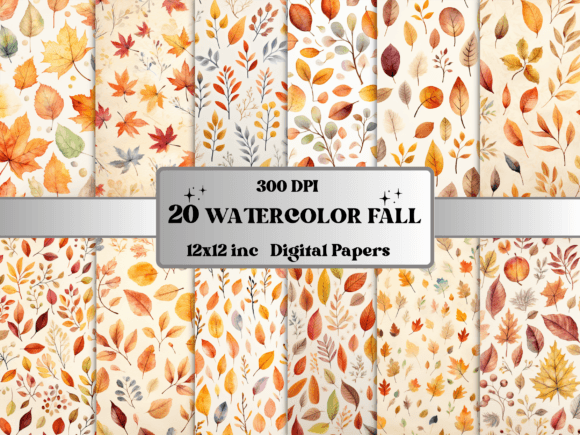
When the air turns crisp and the light shifts to a golden hue, the creative spirit often turns toward capturing that specific seasonal warmth. For designers, publishers, and hobbyists, this translates to sourcing assets that feel organic yet refined. Watercolor Fall Leaves Digital Paper offers a solution that transcends standard graphic design; it provides a tactile, artistic foundation for projects requiring depth and emotion. Unlike seamless, repeating patterns designed for infinite tiling, this collection consists of 20 standalone pages. This distinction is critical for professional use. A standalone page allows for "full-bleed" compositions where the artwork exists as a singular piece, preventing the visual monotony of repetition often found in textile design or web backgrounds. It functions less like a wallpaper pattern and more like a piece of mixed-media art, ready to serve as the canvas for your content.
Visual Characteristics and Artistic Personality
Understanding the visual language of these assets is the first step in utilizing them effectively. The "Watercolor Fall Leaves" aesthetic is defined by its imperfection and fluidity. You will encounter soft, bleeding edges where orange, amber, and ochre pigments blend into one another, mimicking the unpredictable nature of hand-painted media. The design style leans heavily into "rustic elegance" and "vintage charm," avoiding the hyper-saturated, plastic look of vector graphics in favor of a matte, textured finish.
The personality of this digital paper is warm, nostalgic, and sophisticated. It does not shout for attention with neon brightness; rather, it invites the viewer in with a whisper of tradition. This makes it an excellent background for serif typography or elegant script fonts, where the organic texture of the watercolor complements the refined structure of the letterforms. The lack of a seamless pattern means each of the 20 files has a distinct focal point and compositional flow, guiding the eye naturally across the page.
Strategic Applications: From Branding to Junk Journals
The versatility of these files extends across numerous industries. For the small business owner or brand strategist, these papers offer a unique way to soften a corporate identity during the Q4 season. They are particularly effective in packaging design for artisanal goods, such as candles, soils, or baked goods, where the "handmade" aesthetic is a selling point. When used in logo design presentations or mood boards, they can establish an immediate emotional connection with the audience, signaling that a brand values tradition and craftsmanship.
For digital marketers and content creators, the high-resolution nature of these assets (300 DPI JPGs) ensures they remain crisp even when cropped or zoomed. They are ideal for creating:
- Social Media Graphics: Use a standalone page as a background for Instagram quotes or Facebook headers. The warm color palette naturally increases engagement during the autumn months.
- Web Design Elements: While not seamless, they work beautifully as hero images on landing pages or as background textures for specific content blocks, adding depth without distracting from the text.
- Editorial Design: Publishers can use these as chapter dividers in e-books or as background layers for magazine layouts, creating a cohesive visual narrative.
For the hobbyist and crafter, specifically those involved in junk journaling and scrapbooking, these files are indispensable. Because they are 12x12 inches, they match the standard size of scrapbook paper perfectly. You can print them on heavy cardstock to create journal covers, ephemera pockets, or background layers for photo layouts. The watercolor texture hides printing imperfections and adds a layer of sophistication that plain cardstock cannot achieve.
Technical Precision: The Value of High-Resolution Assets
One of the most overlooked aspects of digital paper is the technical specification. These files are provided at 300 DPI (dots per inch), which is the industry standard for professional printing. This is a crucial distinction from low-resolution web images. A 72 DPI image might look fine on a screen, but it will appear pixelated and muddy when printed. With 300 DPI, the watercolor brush strokes remain distinct, and the gradients between colors stay smooth.
The 12x12 inch format at this resolution provides a large canvas, giving you flexibility in how you crop or scale the image. If you are designing a standard A4 document or a US Letter size page, you have ample room to adjust the composition without losing quality. This high fidelity ensures that whether you are printing a physical scrapbook page or using the asset in a high-definition video production, the visual integrity of the design remains intact.
Integrating Watercolor Textures with Typography
When pairing fonts with watercolor backgrounds, contrast is key. Because the Watercolor Fall Leaves Digital Paper has a lot of organic movement and texture, you want to choose typefaces that offer stability and readability. A bold sans-serif font works well for headlines, providing a modern counterpoint to the vintage style of the background. Conversely, a classic serif font can enhance the traditional feel, provided the text is legible against the varying tones of the leaves.
Avoid using light-weight or "thin" fonts directly on top of detailed watercolor areas, as the background texture can break up the letterforms. Instead, use a technique called "knockout" or place a semi-transparent shape behind your text to ensure legibility. This allows the beauty of the autumn leaves to frame the text rather than compete with it. The goal is to let the watercolor art support the message, not overshadow it.
Practical Workflow Tips for Designers
When incorporating these assets into your workflow, consider the following practical steps to maximize their impact:
- Layering for Depth: Don't just use the paper as a flat background. In software like Photoshop or Canva, you can layer multiple elements on top. For example, place a vintage photo with a torn edge over the watercolor base to create a multi-dimensional scrapbook effect.
- Color Sampling: Use the eyedropper tool to select specific hues directly from the watercolor paper—such as a deep burnt orange or a muted sage green—and apply those exact colors to your text or graphic elements. This creates a harmonious, unified color palette.
- Blending Modes: Experiment with layer blending modes (such as Multiply or Overlay) if you are compositing. This can help integrate digital elements, like a logo or a stamp, so they look like they were printed directly onto the paper texture.
Ultimately, the Watercolor Fall Leaves Digital Paper is more than just a seasonal graphic; it is a design asset that bridges the gap between digital precision and analog artistry. Whether you are a marketer building a seasonal campaign, a crafter preserving memories, or a designer creating a brand identity, these files provide the technical quality and aesthetic depth required for professional-grade work. By treating these assets as standalone art pieces rather than mere patterns, you unlock their full potential to tell a rich, visual story.